Firefox Photon vs Firefox Proton
Firefox Photon / Firefox Proton
Both sit in Platform Screen Languages, so the question is not what they belong to but how they behave. They are reached for with some of the same intent, which is where they get confused.
Firefox Photon
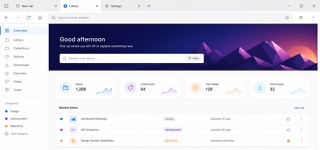
Introduced with Firefox Quantum, Photon unified desktop and mobile around a fast, recognisable Firefox language of compact browser chrome, vivid color, light icons and motion that stays behind the web content.
Firefox Proton
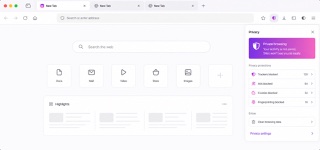
The Firefox 89 redesign made the browser brighter and calmer by streamlining toolbars and menus and adopting floating rounded tabs, lighter iconography, more spacing and a purple-inflected palette across desktop, iOS and Android.
| Firefox Photon | Firefox Proton | |
|---|---|---|
| Era | 2017–2021 / legacy | 2021–2026 |
| Family | Platform Screen Languages | Platform Screen Languages |
| Kind | Style | Style |
| Cues | Compact browser chrome and squared-off tabs / Vivid blue, purple and orange on white or deep navy / Thin simplified line icons / Brief transitions and unmistakable selection or focus | A rounded active tab floating above the toolbar / Text-led menus with fewer redundant icons / Generous spacing and light linear iconography / Neutral browser chrome with purple and blue selection states |
| Best used for | Unifying browser chrome, settings, add-ons and mobile · Tools that must show speed and state without overpowering web content | Unifying browser toolbars, tabs, menus and alerts into a calm language that recedes behind content · Aligning the words and icons of core actions across desktop, iOS and Android |
| Type | Use a platform-friendly sans and brief labels; do not explain every icon twice with text. | Reduce labels to short verbs and nouns; remove redundant icons so wording carries the hierarchy. |
| Composition | Keep browser chrome shallow and favor a single reading column in content and settings surfaces. | Keep the toolbar light, float only the active tab as a rounded independent surface and order menu actions by priority in one column. |
| Material | Start from neutral surfaces and reserve blue, purple and orange for selection, focus and brand moments. | Build on neutral light surfaces and open spacing; reserve purple and blue for focus and selection and shadows for the floating tab. |
| Caution | A Firefox gradient alone is not Photon. Match the density that leaves content dominant and the immediacy of every control state. | More rounding and whitespace alone only lowers information density. Make every removed icon legible through wording and order. |