Apple Desktop Interface vs Palm OS Interface
アップル・デスクトップ・インターフェース / Palm OSインターフェース
Apple Desktop Interface comes from Apple UI and Palm OS Interface from Platform Screen Languages. They are reached for with some of the same intent, which is where they get confused.
Apple Desktop Interface


This is the design language Apple named itself, in the 1987 guidelines book whose subtitle reads The Apple Desktop Interface. Working with one bit of black and white, it wrote down a house style: halftone dot patterns standing in for gray, rounded window corners, a title bar of stacked horizontal rules, and a heavy bitmap face.
Palm OS Interface
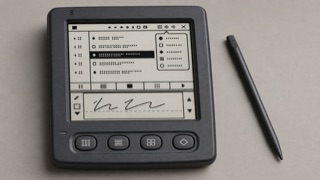
Palm OS turned a tiny monochrome screen, stylus and strict memory limits into a consistent pocket work tool through the Title, Category menu, Command Bar, hardware buttons and Graffiti writing area.
| Apple Desktop Interface | Palm OS Interface | |
|---|---|---|
| Era | 1984–1997 | 1996–2009 |
| Family | Apple UI | Platform Screen Languages |
| Kind | Style | Style |
| Cues | Two tones only, black and white, with gray faked by a checkerboard of black dots / Window corners are rounded and the title bar carries several thin horizontal rules / A menu bar pinned to the top edge of the screen, the Apple mark sitting at its left end / Chicago, a heavy bitmap face whose letters are packed into a cell of 9 by 7 dots | A roughly 160 by 160 low-resolution monochrome screen / Title at upper left and Category pop-up at upper right / A Command Bar rising from the lower edge and four application buttons / Thin one-bit icons, rules and the Graffiti input area |
| Best used for | Redrawing early Macintosh screens for an exhibition panel or an article on a modern display · Designing for a device that can only print or light two tones, such as e paper or a receipt printer | Handling calendar, contacts and notes quickly with an extremely small display and few inputs · Reconstructing an early PDA from its stylus-centered sequence, not only its pixel surface |
| Type | A heavy bitmap sans, letters placed only on whole pixel positions, no anti aliasing; headings differ from body text by size rather than weight. | Use a sturdy bitmap face that separates letters at small sizes and reduce labels to one word. |
| Composition | A full width menu bar owns the top edge and everything below it is the work surface; rounded rectangular windows overlap freely and margins step in whole pixels. | Fix Title and Category above, the list in the middle, and commands and input below to reduce screen changes. |
| Material | Black and white alone; middle values come from checkerboard or diagonal dot patterns, soft shadows and gradients are out, and every boundary is a one pixel black rule. | Work in one-bit black and white, using thin rules, reversed selection and roughly 16-pixel icons for state. |
| Caution | Scaling the bitmap face by anything other than a whole number, or letting it anti alias, blurs the letterforms and erases the placed-by-hand dot density the style lives on. | Monochrome pixel UI alone is not Palm OS. Preserve the division of work among stylus, hardware keys, Graffiti and on-screen commands. |