PatternFly vs SAP Fiori
PatternFly / SAP Fiori
Both sit in Platform Screen Languages, so the question is not what they belong to but how they behave. They are reached for with some of the same intent, which is where they get confused.
PatternFly

Red Hat's open-source screen language for enterprise products keeps complex infrastructure manageable through dense navigation, data views and tightly controlled status color.
SAP Fiori
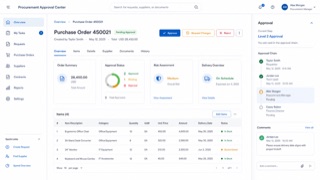
SAP's role-based design language reduces enterprise processes to the information and actions each person needs, then carries them consistently across devices.
| PatternFly | SAP Fiori | |
|---|---|---|
| Era | 2012– | 2013– |
| Family | Platform Screen Languages | Platform Screen Languages |
| Kind | Style | Style |
| Cues | Dark masthead and left navigation / Dense tables and forms on white or pale-gray work surfaces / Blue for primary action and red, orange or green for status / List, detail and action shown in coordinated panes | Role-based launchpad tiles / Shell bar and object pages / Compact tables and semantic status / Calm blue on pale work surfaces |
| Best used for | Administration products for cloud, containers and networks · Giving a suite of enterprise products one density, navigation and status language | Enterprise workflows that differ by user role · Connecting overview, object detail and task completion |
| Type | Keep headings, body and table labels to a small hierarchy; distinguish values and code with monospace. | Use concise business labels and expose status with words as well as color. |
| Composition | Separate dark shell, left navigation, work surface and an on-demand detail pane. | Move from overview to object page to focused task, preserving context throughout. |
| Material | Use white and pale gray broadly, blue for action and saturated color only for alerts and status. | Use pale layers, restrained blue and semantic colors for status only. |
| Caution | Packing cards and tables together is not enough. Make current location and the priority of abnormal states obvious first. | Putting every enterprise function on one screen defeats the role-based premise. Remove what the current task does not need. |