CDE Interface vs OS/2 Workplace Shell
CDEインターフェース / OS/2 Workplace Shell
Both sit in Platform Screen Languages, so the question is not what they belong to but how they behave. They are reached for with some of the same intent, which is where they get confused.
CDE Interface
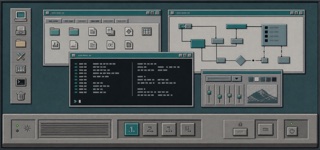
The Common Desktop Environment unified UNIX workstations through Motif-derived bevels, a persistent Front Panel, workspace switching and low-color icons, making different hardware feel like one workplace.
OS/2 Workplace Shell
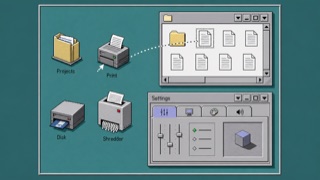
OS/2 treated folders, printers, drives and settings as operable objects rather than loose icons. Dimensional borders, shaded icons, Notebook settings and direct drag-and-drop made the whole desktop one object-oriented workplace.
| CDE Interface | OS/2 Workplace Shell | |
|---|---|---|
| Era | 1993–2000s | 1992–2001 |
| Family | Platform Screen Languages | Platform Screen Languages |
| Kind | Style | Style |
| Cues | Box-like Front Panel along the lower edge / Raised buttons and recessed fields made from paired light and dark borders / Low-color pixel icons with dark outlines / Persistent buttons for switching among workspaces | Pale gray surfaces with double light and dark dimensional edges / Low-color object icons drawn from an oblique view / Notebook settings with stacked edge tabs / Direct dragging among folders, shredder and drives |
| Best used for | Shipping one desktop and business application language across UNIX workstations · Reconstructing a 1990s technical terminal with its operating structure intact | Handling files, devices and settings as one environment of related objects rather than separate applications · Reconstructing a 1990s work desktop from its object model instead of window decoration |
| Type | Use brief system type and labels that remain distinct at small sizes. | Use a small system sans and keep object names to one line directly below their icons. |
| Composition | Layer work windows centrally and keep the Front Panel and workspace switch along the lower edge. | Use the desktop as a base, overlap folder windows, and gather settings into a multi-tab Notebook. |
| Material | Place a light top-left edge and dark bottom-right edge on mid-tone surfaces, reversing the bevel only on press. | Layer light upper-left and dark lower-right edges on middle gray, giving icons limited color and small shadows. |
| Caution | Gray bevels alone are not CDE. Front Panel, workspaces and Motif state rules must work as one environment. | Old icons and 3D buttons are not enough. Every part must behave as a directly operable, related object. |