Metalheart vs Winamp Skin
メタルハート / Winampスキン
Metalheart comes from UI Expression and Winamp Skin from Digital Retro. They are reached for with some of the same intent, which is where they get confused.
Metalheart
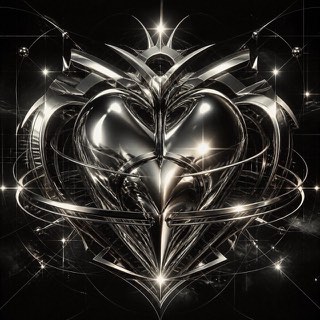
Early 3D software gave this fin-de-millénaire style its chrome, liquid metal, aggressive bevels and lens flare. Dressed in techno and science-fiction imagery, it ruled rave flyers and games magazines around Y2K.
Winamp Skin
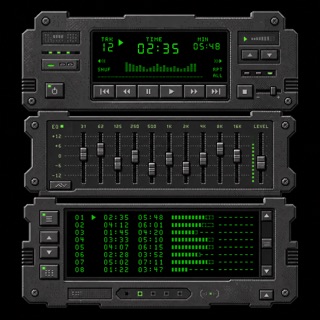
Player faces drawn and passed around by amateurs. The rectangular window frame is thrown away for the front panel of a piece of stereo equipment, and even the digits and letters are drawn as bitmap pictures laid side by side on a single sheet.
| Metalheart | Winamp Skin | |
|---|---|---|
| Era | 1995–2004 | 1997–2005 |
| Family | UI Expression | Digital Retro |
| Kind | Style | Style |
| Cues | Liquid-metal chrome / Aggressive bevels / Lens flares / Techno and sci-fi typography | A non rectangular outline that imitates the front panel of a piece of stereo equipment / Digits and letters drawn as tiny monospaced bitmaps laid out on one sheet / Metal reflections and glowing displays built by placing dots rather than by tonal gradation / Three windows, player, equalizer and playlist, snapping together into one upright device |
| Best used for | Club and rave announcements rebuilt with the texture of that era's 3D · Showing off technology through excess instead of refinement | Rebuilding the feel of late 1990s desktop culture inside a screen for an exhibit or a video · Designing a theming mechanism where a user swaps nothing but a folder of bitmaps |
| Type | Extrude the letters, bevel them deep, and bake in mirror reflections | Draw letters as bitmaps rather than setting type. Lay digits and letters out at fixed width on one sheet and blit only the glyphs you need. |
| Composition | One large object at center, the ground filled with grids and beams | Freeze the coordinates of every control and change only the artwork. Split the interface into role specific windows and cut each silhouette from the transparency of a single image. |
| Material | Chrome, liquid metal, lens flare, reflections carrying surrounding color | Work in a small palette at one to one pixel scale with no resampling. Render both metal reflection and glowing readouts purely by how the dots are arranged. |
| Caution | Polishing it clean in current software removes the rawness that came from the crude renderers of the time, and it becomes something else. | Because the coordinates are fixed, the louder the artwork gets the more the controls sink into it, so check the contrast between decoration and operable surface after the art is done. |