CDE Interface vs Motif
CDEインターフェース / モチーフ
Both sit in Platform Screen Languages, so the question is not what they belong to but how they behave. They are reached for with some of the same intent, which is where they get confused.
CDE Interface
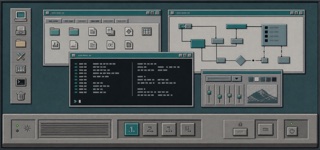
The Common Desktop Environment unified UNIX workstations through Motif-derived bevels, a persistent Front Panel, workspace switching and low-color icons, making different hardware feel like one workplace.
Motif


Motif is the interface language of UNIX workstations, maintained by The Open Group, standardized as IEEE 1295 and shipped on more than two hundred platforms. Its own data sheet calls the look a distinctive 3D beveled appearance, meaning every part sits on a gray face edged with one light line and one dark line.
| CDE Interface | Motif | |
|---|---|---|
| Era | 1993–2000s | 1989– |
| Family | Platform Screen Languages | Platform Screen Languages |
| Kind | Style | Style |
| Cues | Box-like Front Panel along the lower edge / Raised buttons and recessed fields made from paired light and dark borders / Low-color pixel icons with dark outlines / Persistent buttons for switching among workspaces | A gray face lit along its top and left edges and darkened along its bottom and right, so every part appears raised / While a control is held down the two edge colors swap and the part sinks / A thin rectangular ring is drawn around whichever control currently takes keyboard input / Scroll bars are square cornered rectangles with a triangular arrow button at each end |
| Best used for | Shipping one desktop and business application language across UNIX workstations · Reconstructing a 1990s technical terminal with its operating structure intact | Rebuilding a UNIX workstation era application for an exhibit or a technical write up · Building instrument or CAD controls where pressable and unpressable must read as relief rather than color |
| Type | Use brief system type and labels that remain distinct at small sizes. | A small sans at one fixed size, labels held to a single line, no letterspacing and no ornament inside the text. |
| Composition | Layer work windows centrally and keep the Front Panel and workspace switch along the lower edge. | Windows are cut into beveled rectangles and controls are packed a few pixels apart; there is almost no breathing room, the screen is filled with operable parts. |
| Material | Place a light top-left edge and dark bottom-right edge on mid-tone surfaces, reversing the bevel only on press. | Pick one face color, derive a light edge and a dark edge from it, and paint them on opposite sides; swap the two while pressed, and never round a corner. |
| Caution | Gray bevels alone are not CDE. Front Panel, workspaces and Motif state rules must work as one environment. | Replacing the two hard edge colors with a soft drop shadow kills the flip that signals a press, leaving decoration that merely looks raised. |