Carbon Design System vs Elastic UI
Carbon Design System / Elastic UI
Both sit in Platform Screen Languages, so the question is not what they belong to but how they behave. They are reached for with some of the same intent, which is where they get confused.
Carbon Design System


IBM's system for data-heavy enterprise products, combining a strict grid, IBM Plex type and compact components so complex work remains legible.
Elastic UI
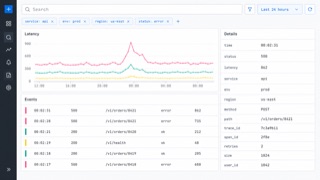
Elastic's interface system is made for searching, filtering and diagnosing large data sets without losing operational density.
| Carbon Design System | Elastic UI | |
|---|---|---|
| Era | 2015– | 2017– |
| Family | Platform Screen Languages | Platform Screen Languages |
| Kind | Style | Style |
| Cues | IBM Plex and strong type hierarchy / White or deep-gray work surfaces / Dense tables, filters and side navigation / Blue reserved for action and focus | Fixed header and left navigation / Persistent query, filter and time controls / Tables and time-series charts in shared panels / Bright series colors limited to data |
| Best used for | Enterprise software with many states and permissions · Keeping analytics, operations and forms coherent across products | Log and security investigation screens · Products that combine query, table, visualization and detail |
| Type | Use IBM Plex with compact labels and a clearly stepped hierarchy. | Separate monospaced values from explanatory sans text and never rely on color alone. |
| Composition | Anchor dense modules to a 2x grid and keep navigation, work and detail zones distinct. | Give navigation, query, visualization and detail stable regions; keep time and filters visible. |
| Material | Build with neutral layers, fine borders and blue only for interaction. | Layer neutral surfaces, reserve blue for interaction and bright hues for data series. |
| Caution | Plex and blue do not make a product Carbon. Density, states and grid behavior must follow the same system. | More charts do not create more insight. Remove any panel or series that does not answer the current question. |